
Built for UK schools, trusts and businesses
Lockdown Alert: the lockdown alert system for every screen in your building
Dial a number, press a panic button or send an email. Every PC and screen in the building shows your lockdown message in seconds.


- Dialling the lockdown number on any desk phone
- Pressing a panic button under the desk
- Sending an email to your lockdown address
- Tapping the red button in the portal
- Pressing a button on the door intercom
- Letting a CCTV alarm rule start it
- Free trial30 days, no card needed
- £350From, per site per year
- Every devicePCs, Macs, phones, tablets and TVs
- UKHosted data and support
Compatible with
Every device in your building. Install the app where there is one, or open the wall display in any web browser.
- Windows PCsDesktop app
- AndroidApp on Google Play for phones, tablets and boards
- MacDesktop app, alert even at the login screen
- iPhone and iPadApp on the App Store
- ChromebooksChrome extension from the Web Store or Google Admin
- Any web browserFull-screen wall display
- Smart TVs and signageFire TV app, browser or signage system
- Interactive panelsClevertouch and more
Windows PCs run the desktop app, deployed through Microsoft Intune or installed by hand. Chromebooks run the Chrome extension from the Chrome Web Store, or pushed to every Chromebook through Google Admin. Both are set up from your portal. Android phones and tablets, and interactive boards such as SMART Board, Promethean and Clevertouch, run the Android app from Google Play, so a lockdown takes over the board too, and so do Fire TV sticks and Fire TV Edition televisions. The Mac app installs from your portal or through your Mac management tool and shows the alert even at the login screen. The iPhone and iPad app is on the App Store, where the alert arrives as an urgent notification, because Apple does not let any app take over the screen.
The apps
Get it on the App Store, Google Play and the Chrome Web Store
Install from the store each device already uses, with nothing to sideload. Windows and Mac apps are on the Downloads page in your portal, ready for Intune and your Mac management tool.
Impossible to miss
It takes over the screen. Locked, asleep or busy.
A lockdown alert is no use if it waits politely behind a lock screen or a lesson. Lockdown Alert pushes through, on every screen at the site.
- Windows PCs: wakes screens that have gone to sleep and shows the alert over the lock screen, on every monitor, with the siren. Nobody has to sign in, and the PC stays locked.
- Android phones and tablets: the alert takes over whatever the device is doing, full screen, with sound.
- Chrome browsers: full screen on every display, on top of whatever is open.
- It stays until it is acknowledged or the ALL CLEAR is sent, then every screen shows ALL CLEAR.
How it works
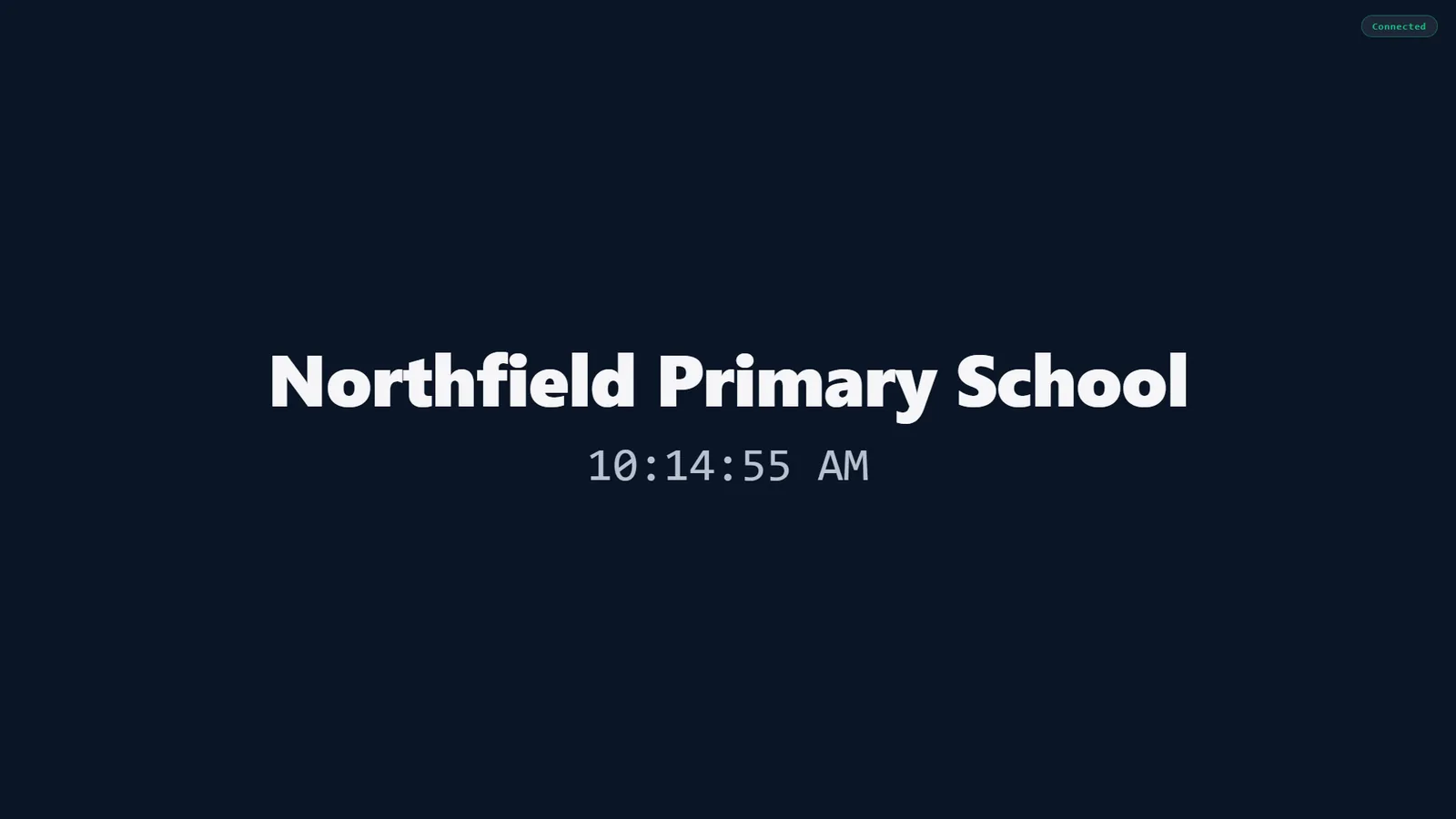
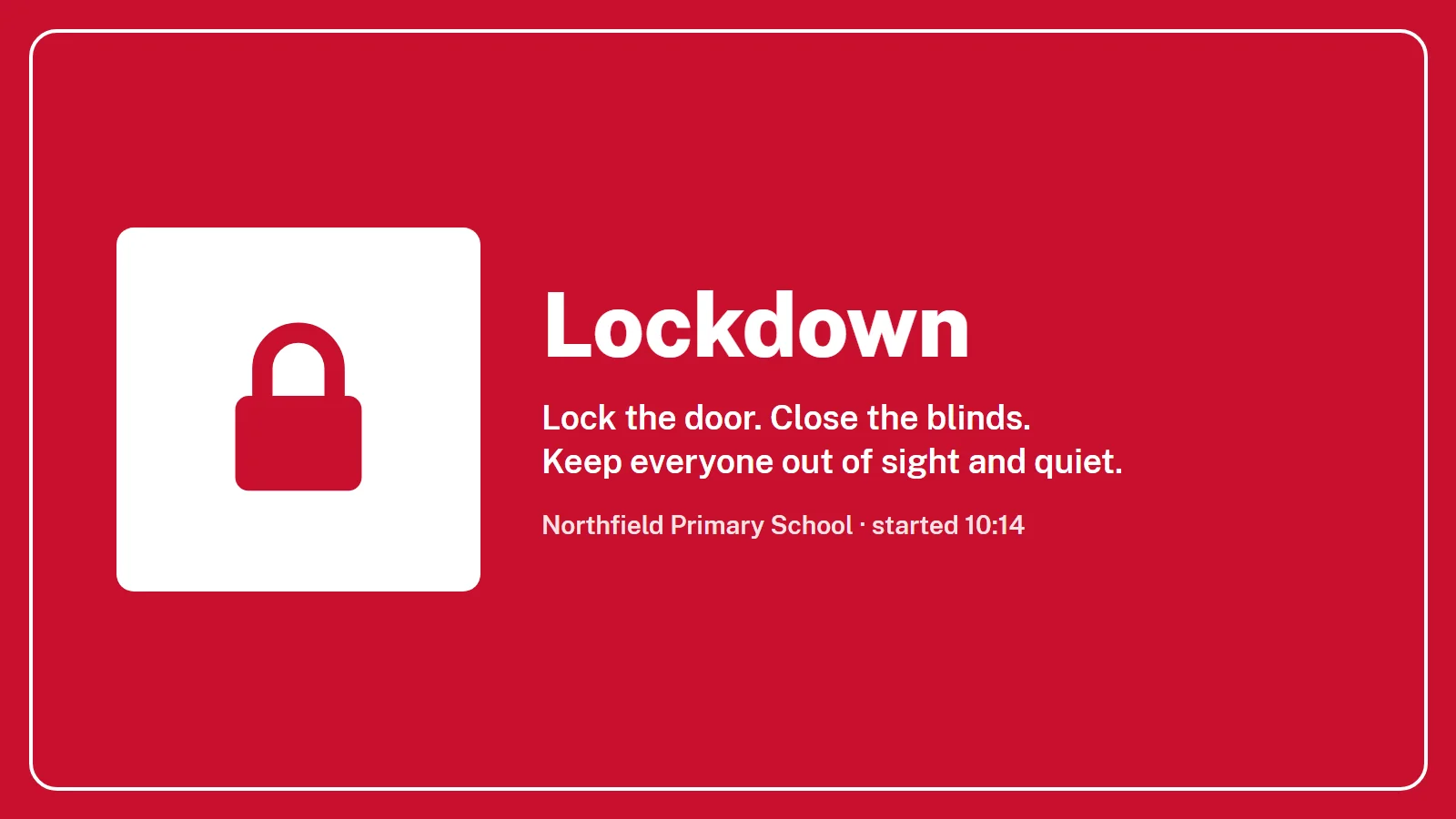
See exactly what your staff will see
Real screens from Lockdown Alert. Pick one to see it, or watch the how-to videos.
Full-screen lockdown
- Every PC and wall screen at the site, at once
- Your heading, instructions, colours and sound
- Stays up until ALL CLEAR or the auto-close time you set
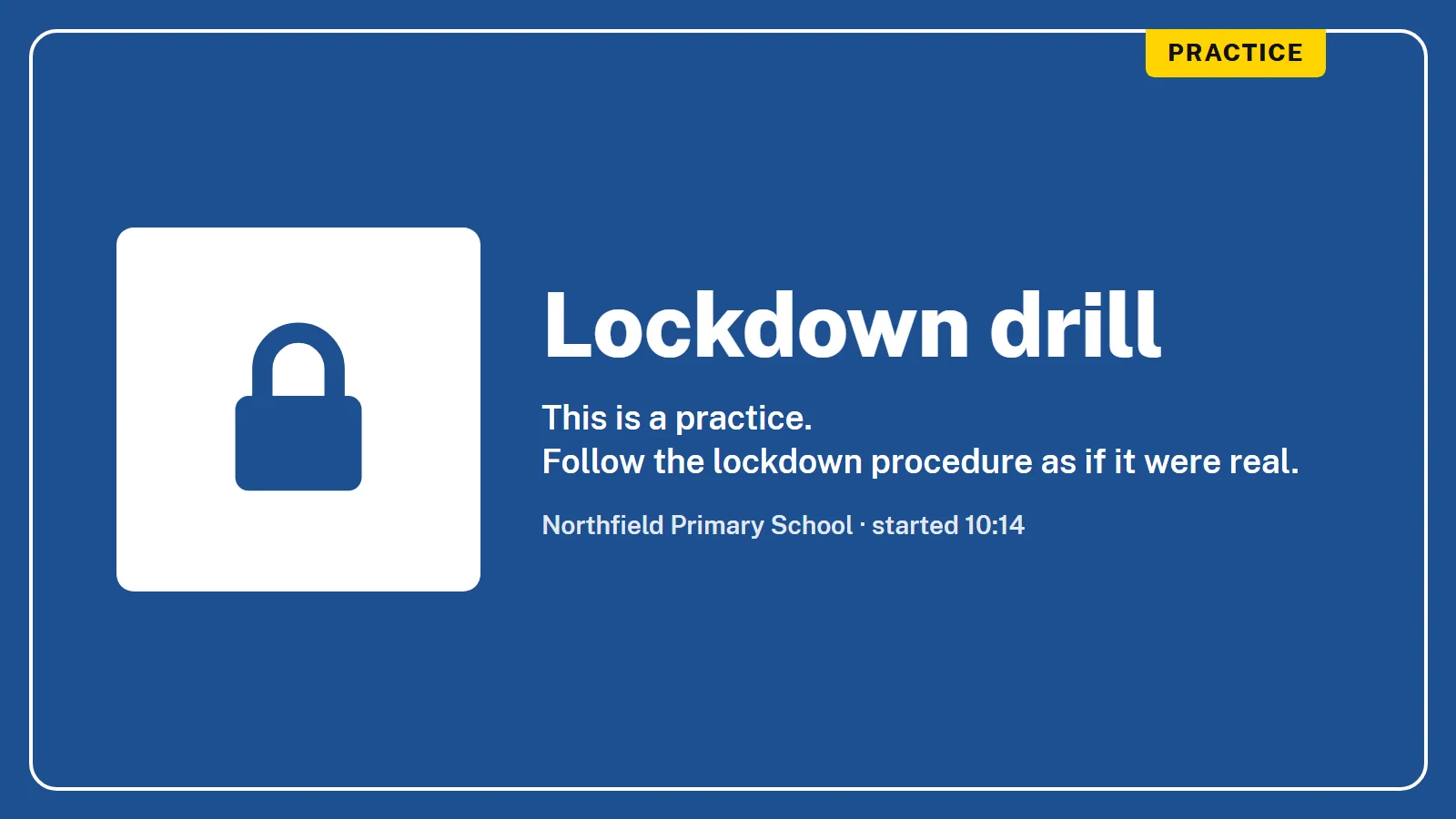
Drills that look like drills
- Always marked with a yellow PRACTICE plate, so nobody mistakes practice for the real thing
- Run one from the portal or on a schedule
- PCs on a schedule skip drills out of hours
Stand everyone down
- Send ALL CLEAR from the portal, by email or from the phone system
- Every screen goes back to normal at once
- The history records when it was cleared
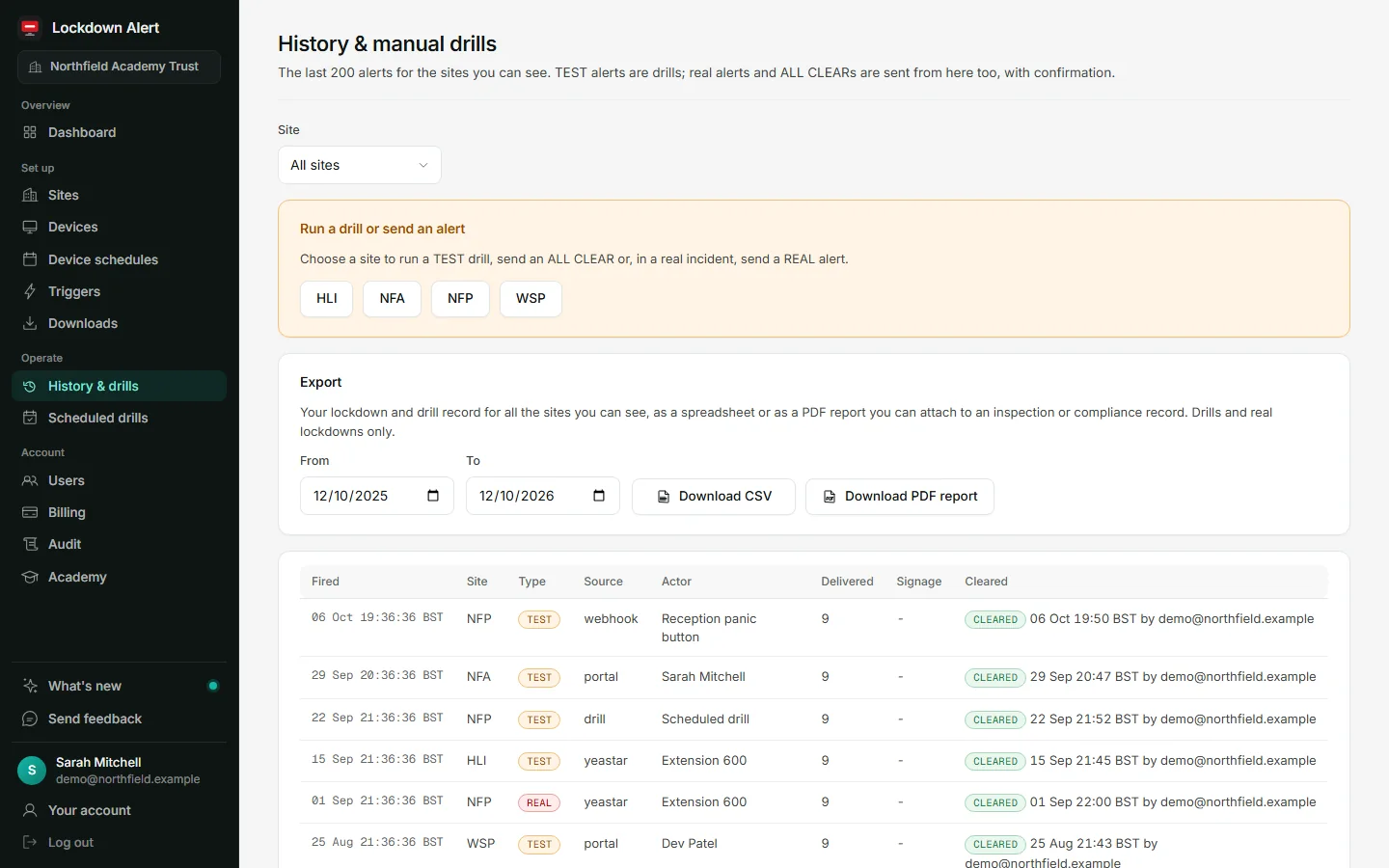
A record of every alert
- Who started it, how and when
- How many screens showed it, and when it was cleared
- Drill history you can show governors and inspectors
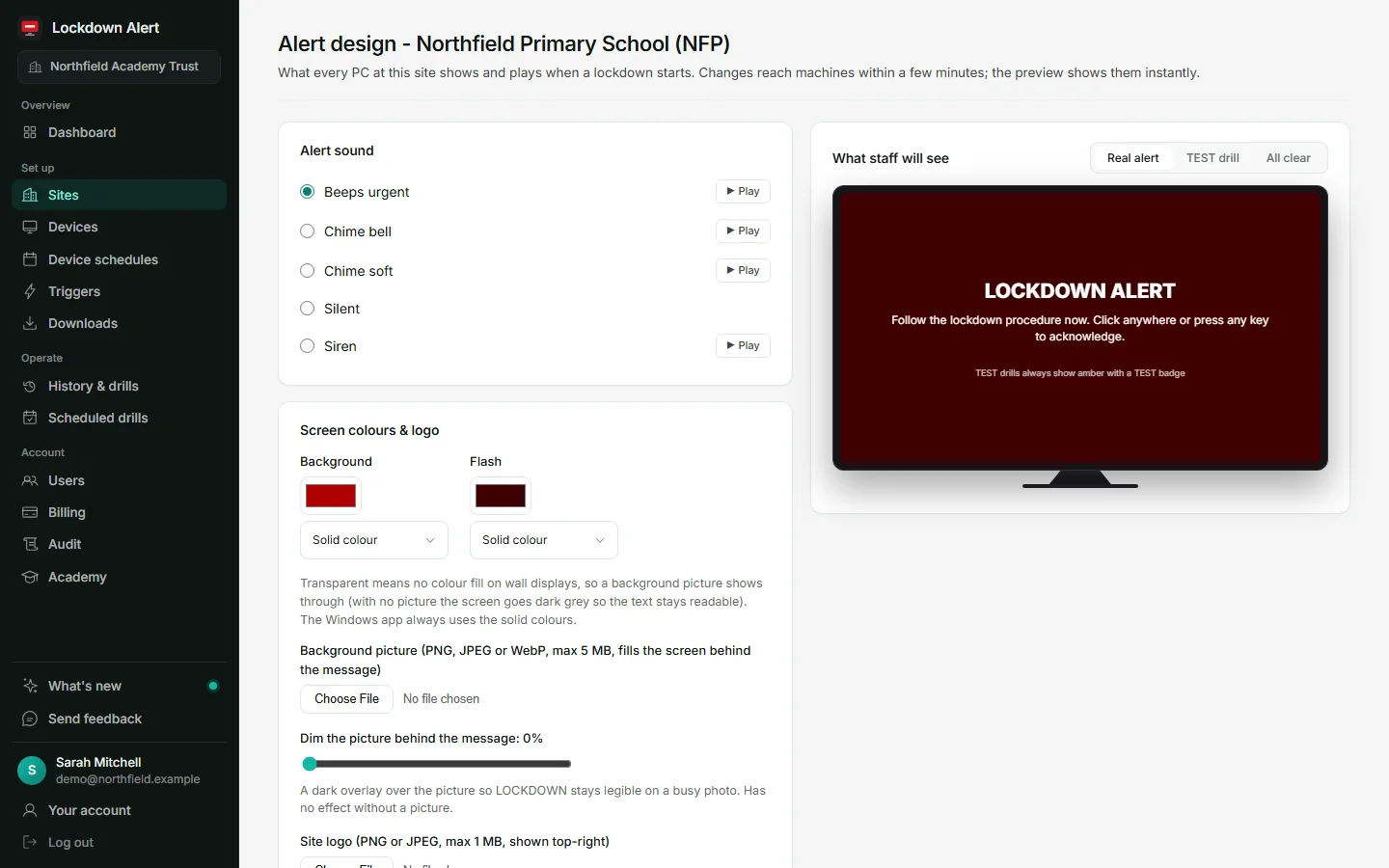
Your words, colours and sound
- Set the heading, instructions, colours and logo for each site
- Four alert sounds or silent, with a live preview
- Hide the Windows tray icon per site if you prefer
Integrations
Works with the systems you already have
And any phone system, alarm or building system that can send an email.

Triggers
Start a lockdown from almost anything
Phones, panic buttons, door intercoms, cameras and apps. If it can make a call, send an email or open a web link, it can start a lockdown.
Phone systems
Dial the lockdown number from any desk phone.
- SIP speakers and paging (multicast)
 Yeastar
 FreePBX and Asterisk
 Wildix
 3CX
- Yealink, Fanvil and other SIP phones
- Any system that can send an email
 Gamma Horizon
 BT Cloud Voice
Panic buttons
A wireless button under a desk or by the door.
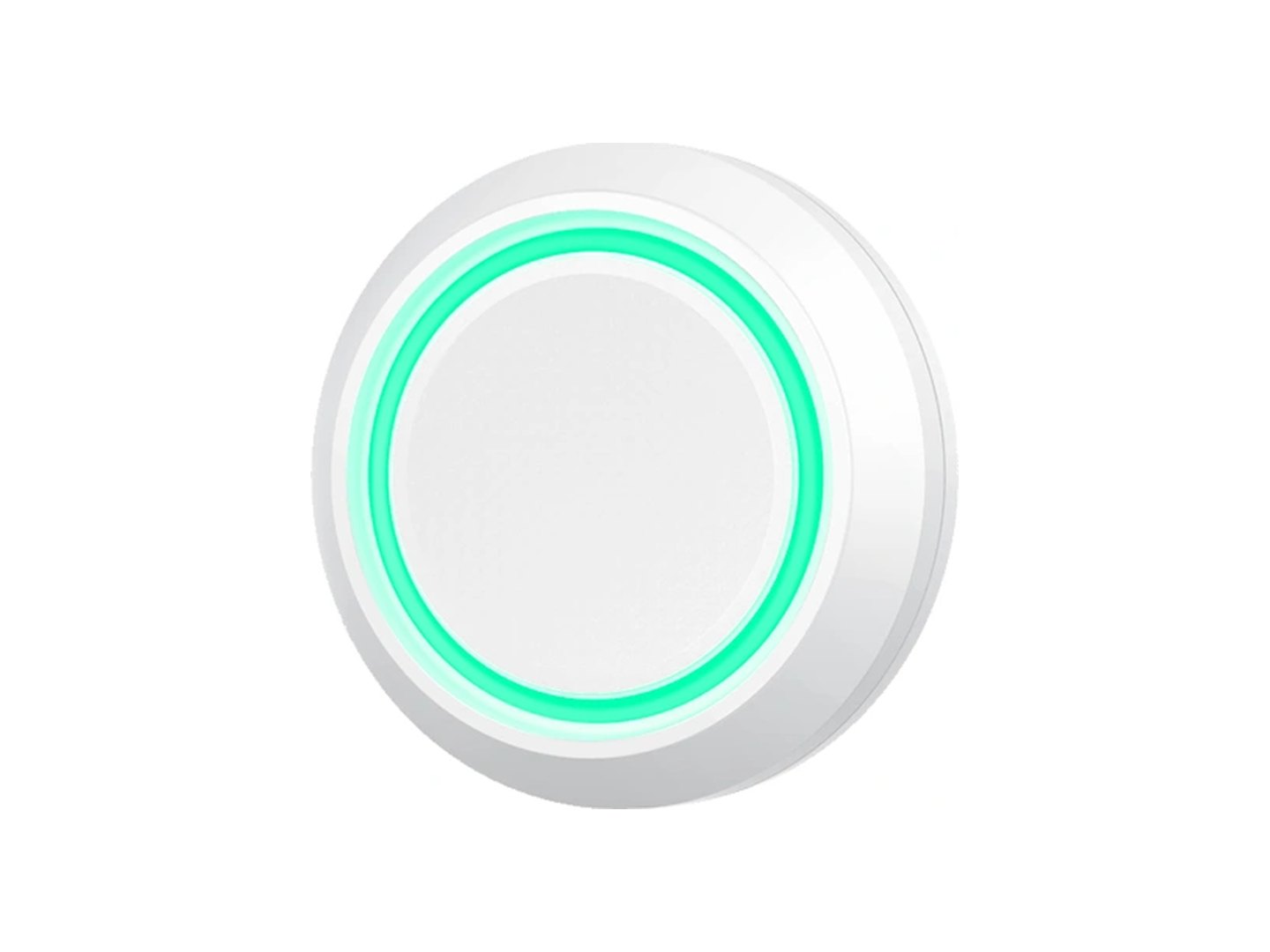 Lockdown Alert panic button
Our own wireless button, fixed under a desk or beside the door. Heard directly by the apps in range: no hub, no Wi-Fi set-up. From £45 each.
Buy panic buttons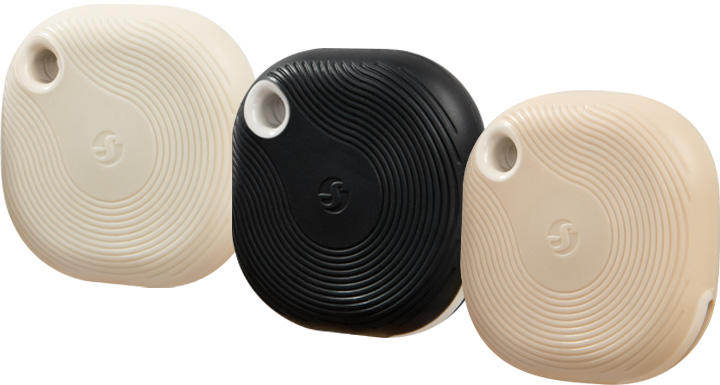 Lockdown Alert key fob button
Our own wireless button to carry on your keys or a lanyard. No hub, no Wi-Fi set-up. From £45 each, in white, black or mocha.
Buy key fob buttons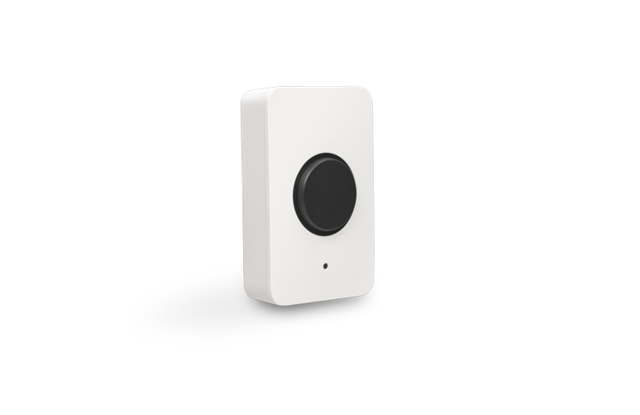 Cisco Meraki MT30
Talks to your Meraki access points, so it needs no hub. One press starts a lockdown within seconds.
Works on
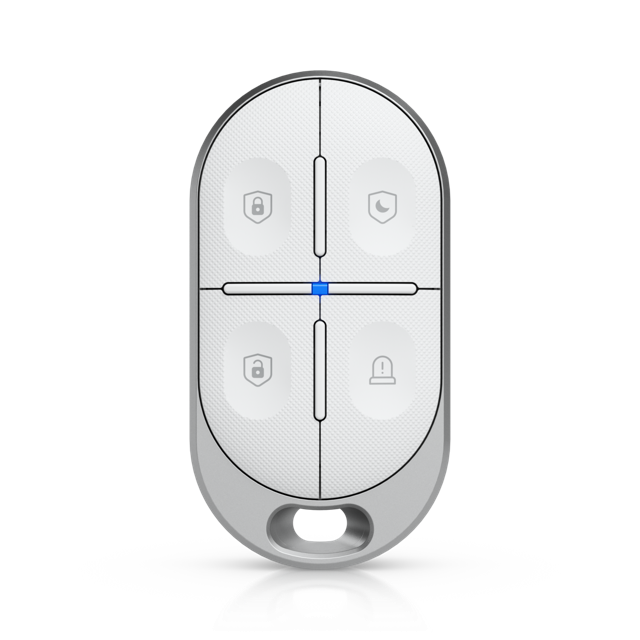 UniFi Protect key fob
The Panic button on the SuperLink key fob, through UniFi Protect's Alarm Manager.
Works on
Door entry and intercoms
A button on the door panel or intercom.
- Door access or relay
- Door access or relay on your own network
 2N
- Akuvox
Cameras and CCTV
Your CCTV system's own alarm rules.
 Milestone XProtect
- UniFi Protect
 Axis
- Hikvision
Apps and automations
If it can open a web link, it can start a lockdown.
- Anything that can open a web link
- Power Automate
 Zapier
 IFTTT
Screens and signage
The TVs and signage screens you already have.
 Yodeck
 Xibo
 ScreenCloud
- CAP alert feeds
- Any screen with a browser
 TrilbyTV
 Clevertouch CleverLive
 SMART Board
 Promethean
 Fire TV and Android TV
- Signagelive
Lockdown email address
Your own lockdown email address
Every school gets a private address that only Lockdown Alert knows. Email it, and every screen at the site responds.
- Works with 3CX, Gamma Horizon, BT Cloud Voice and any system with no API, through its own email alerts.
- Narrow it to one site with SITE: and the site code, or lock down every site at once.
- The address is a secret. Rotate it any time from the portal; bounces and auto-replies are ignored.
Panic button
Fixed under a desk or by the door. White.
Key fob button
On your keys or a lanyard. White, black or mocha.
Panic button
Add panic buttons
Two small wireless buttons: a panic button for under the reception desk or beside the door, and a key fob button to carry on your keys. One press, and every screen at the site goes into lockdown; two presses run a drill, three send the all clear. No hub: the buttons use Bluetooth, and any nearby device with the Lockdown Alert app installed picks up the press.
- £45Each, ex VAT. From £30 at 25 or more
- No hubBluetooth to any device nearby with the Lockdown Alert app
- Fixed or key fobStick one down or carry one. No wiring
- Battery includedYour dashboard shows each battery level
- EncryptedPaired to your site. Look-alike buttons are ignored
- Four pressesLockdown, drill, all clear, clear screens
Already have smart buttons? Cisco Meraki MT30 and UniFi Protect key fobs work too, and anything that can open a web link.
Schools and trusts
Built for schools and trusts
One alert that reaches every room at once: classrooms, quiet rooms, IT suites, offices and staff in headphones.
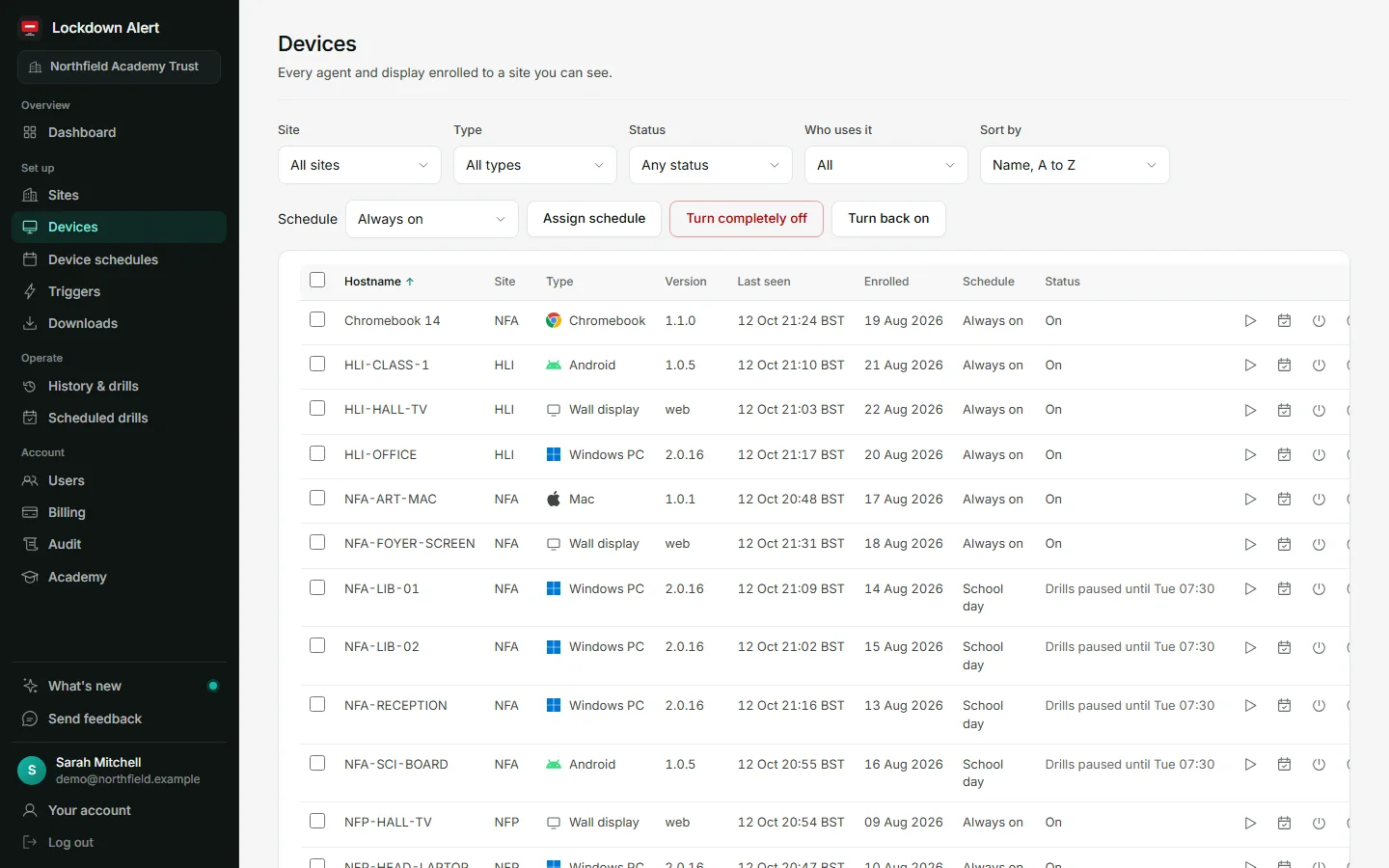
Each school is its own site
A lockdown at one school in a trust never appears at another.
Drills on a schedule
With a history you can show governors and inspectors.
Fire alarms and fire drills
An evacuation message on every screen in its own colour, with fire drills on the same schedule and record.
IT suites skip drills out of hours
Real lockdowns always get through.
Deploys through Intune
Every Windows PC in an afternoon, using our Intune guide.
Your alert
Your words, colours and sound
Set what staff see and hear for each site, and preview it before you save.
- Heading, instructions and coloursPlus a banner and your school logo.
- Four alert sounds or silentRepeating for 5 to 60 seconds.
- A clean taskbar if you preferHide the Windows tray icon per site.
Workplaces
Workplaces use it too
An intruder at reception. A violent visitor. One call, and every screen in the building knows.
Reception
A panic button under the desk, or the lockdown number dialled from any desk phone.
Surgeries and care homes
Tell every room at once, quietly, without a shout that frightens patients and residents.
Warehouses and depots
A door intercom, a CCTV rule or an alarm panel can start it, and the wall screens show it.
Several sites
One portal for all of them, with every alert and drill on record.
Panic buttons and desktop alerts for businesses Business plans from £350 a year
For your home
A silent cry for help, heard by the whole family
Your child presses their button and your phone goes off. Their phone shows nothing and makes no sound, so nothing gives them away. The same button works for a relative living alone, or an intruder at home.
Children out of the house
A button with their phone. One press and mum and dad know, while their own phone stays silent.
Caring for a relative
A parent or grandparent living alone presses for help, and every family phone goes off at once.
An intruder at home
A button by the bed or the door alerts everyone else in the house without a sound from yours.
Three homes, one account
Home Plus covers your house, a relative's home and your children's phones.
Home Edition from £5.99 a month and Home Plus from £7.99 a month, inc VAT, with a free 30-day trial. It tells your family; it does not call the emergency services. Lockdown Alert for your home

About us
Built by someone on the front line of education
Lockdown Alert was built by Chris Jakubowski, who works on the front line of education in a UK multi-academy trust.
- 6,000+pupils
- 1,000staff
- 20locations
Visual lockdown alert systems on the market cost far more than most schools can find in their budget, with beacons, signs and cabling in every room. But every classroom, office and corridor already has a screen. So Chris built Lockdown Alert to use them.
It started life in a real school in the trust, and every part of it is built around how schools actually work: drills on a timetable, IT suites that stay quiet out of hours, every school in a trust kept separate, and a record you can show governors.
Made in the UK, for UK schools and the people who keep them safe.
Ready for Martyn's Law
Schools and other premises with 200 or more people will need procedures to lock down and to tell people quickly. Lockdown Alert gives you the alert, and a record that you test it.
Every school is standard tier
Primary, secondary and further education sites with 200 or more people are standard tier, however big they are.
Lockdown is a named procedure
The Act lists preventing people entering or leaving, and giving people on site information, among the procedures you need.
Expected from spring 2027
The SIA will regulate and will confirm the date in advance. Spring 2027 sits inside the 2026/27 budget year, so the money for it is being decided now.
It supports your procedures for site alert systems, visual and audible. Correct at 30 September 2026. What Martyn's Law means for you
Compare
How it compares
Most schools already have one or two of these. Lockdown Alert is the one that reaches every screen, every time.
| What you need | Tannoy or bells | Staff group chat | SMS alert service | Lockdown Alert |
|---|---|---|---|---|
| Reaches quiet rooms, offices and staff in headphones | Only where it can be heard | Only if they look at their phone | Only if they look at their phone | Yes. Every PC and screen, with sound |
| Anyone can start it, from several places | From the office microphone | Anyone in the group, by typing | Whoever has the sending login | Phone call, panic button, door intercom, CCTV, email or the portal |
| Says which emergency it is: lockdown or fire | Different tones, if staff remember them | Only in the words used | Only in the words used | Yes. Fire alerts have their own colour, wording and sound |
| Drills look different from the real thing | Only in the words used | No | No | Yes. Blue, with a yellow PRACTICE plate |
| A record of who started it, when, and how many screens showed it | No | Read receipts at best | Delivery reports | Yes. In the portal history |
| Depends on staff carrying a personal phone | No | Yes | Yes | No |
One price per site, per year
Every plan includes every integration, the portal, drills, fire alerts, updates and UK support.
Schools and colleges
Businesses
Multi-site
20% off
Every site after the first
All prices exclude VAT.
Buy now takes you to our shop, shop.input-it.co.uk, where you pay securely by card.
Panic buttons start at £45 each in the panic button shop, with discounts when you buy more, delivery £4.95. Licences by card online, or purchase orders accepted.
Per week, that is under £8 for a small primary, under £14 for a secondary school and under £7 for a small business.
When a trial ends nothing is billed. Alerts stop until you choose a plan, and your sites, devices and settings are kept so everything carries on as soon as you buy. Licences renew each year and you can cancel any time before the renewal date (terms).
Does this make us Martyn's Law compliant?
No single product does. It gives you a fast lockdown alert on every screen and a record that you test it, which supports your lockdown and communication procedures. More on Martyn's Law.
Does it replace our PA or tannoy?
It can, depending on the equipment you have in each room or classroom. Where every room has a PC, an interactive board, a wall display or staff with their phones, it can replace a tannoy for lockdown alerts; otherwise it works alongside one. Either way it reaches the rooms and people a PA can miss: quiet rooms, IT suites, offices and staff in headphones. It does not replace your fire alarm.
Can it tell people to evacuate for a fire?
Yes, on every plan. Start a fire alarm or a fire drill from the portal, a panic button or a webhook, and every screen tells people to leave the building, in its own colour and with its own sound, so nobody mistakes it for a lockdown. If a real lockdown is live, nothing changes until a person in the portal confirms the switch to evacuate. It works alongside your fire alarm, which you still sound as normal.
What ways are there to start a lockdown?
Dial the lockdown number on your phone system, press a panic button, press a button on a door intercom, let your CCTV alarm rules start it, send an email from your phone system, alarm panel or inbox, or tap the red button in the portal on any phone or PC.
Our equipment is not on your list. Can it still start a lockdown?
Yes. Any device or system that can trigger a webhook can start a lockdown, and there are lots of integrations already. If you are unsure, our tech team can help find the right one for you.
Why does it cost less than other lockdown systems?
Because it uses what a school already has. Most visual lockdown systems put beacons, signs and cabling in every room. Lockdown Alert shows the alert on the PCs, interactive panels, TVs and signage already in school, and starts from the phone system already there, so there is nothing to wire and no installation visit. It costs £395 a year for a small primary, £695 for a large primary or secondary and £995 for a college, excluding VAT, with every integration included.
What happens on a locked PC?
It shows over the lock screen without unlocking the PC, and wakes the screens if they have gone to sleep. It stays until someone at the PC acknowledges it, the ALL CLEAR is sent, or the auto-close time you set for the site. Always-on screens, like reception and wall displays, show it straight away.
Does it need a licence on our Yeastar?
Yeastar's Open API is included on P-Series plans with API access. Nothing is installed on the phone system.
Which phone systems work with Lockdown Alert?
FreePBX, Asterisk, Wildix and Yeastar work today. Any phone system that can open a web link when a number is dialled can start a lockdown, and you can also start one by email or from the portal.
Does it work on Macs, iPhones and iPads?
Any screen with a web browser can show the wall display, which plays the alert sound once someone taps Enable sound on it. The Mac app shows the alert full screen, even at the login screen, and the iPhone and iPad app is on the App Store. Apple does not let any app take over an iPhone or iPad screen by itself, so there the alert arrives as an urgent notification and fills the screen when it is tapped. Windows PCs and Android devices show the alert full screen on their own.
Can some PCs skip drills?
Yes. Give devices a schedule, and outside those hours they skip drills and tests. Real lockdowns always get through, unless you switch a device completely off.
Where is our data?
In the UK, with each organisation kept separate. A data processing agreement is available on request.
What do the PCs send back?
Hostname, Windows version, site, app version and connection status. Never screen contents.
What if the internet drops?
Rarely, if the DfE digital and technology standards are met: they expect every school to have a full fibre line with a backup connection by 2030, so a dropout should be the exception. If one does happen, PCs show as disconnected in the portal and reconnect by themselves, and the alert channel resumes the moment the line is back. Your PA system stays part of your plan.
Start your free trial
- 30 days, 25 devices, every integration.
- No card needed.
- We email you a link to set your password, then you set everything up yourself.
Check your email
We have sent your set-up link to .
- Open the email from Lockdown Alert.
- Click the link and choose a password.
- Your 30-day trial starts as soon as you sign in.
The email can take a few minutes. Look in your junk folder too. The link works for 7 days. If nothing arrives, email [email protected].